Secure Cell Phone Setup Checklist (Lock Screen To Backups)


Introduction
A straight-through checklist you can follow from the moment your screen locks to where your data lives when the phone is off.
You do not need to be paranoid. You just need to be intentional.
Read top to bottom once. Then come back and implement section by section.
Is your cellphone vulnerable to SIM Swap? Get a FREE scan now!
Please ensure your number is in the correct format.
Valid for US numbers only!
Lock Screen: Your First And Strongest Line Of Defense
If someone gets past your lock screen, everything else is cleanup.
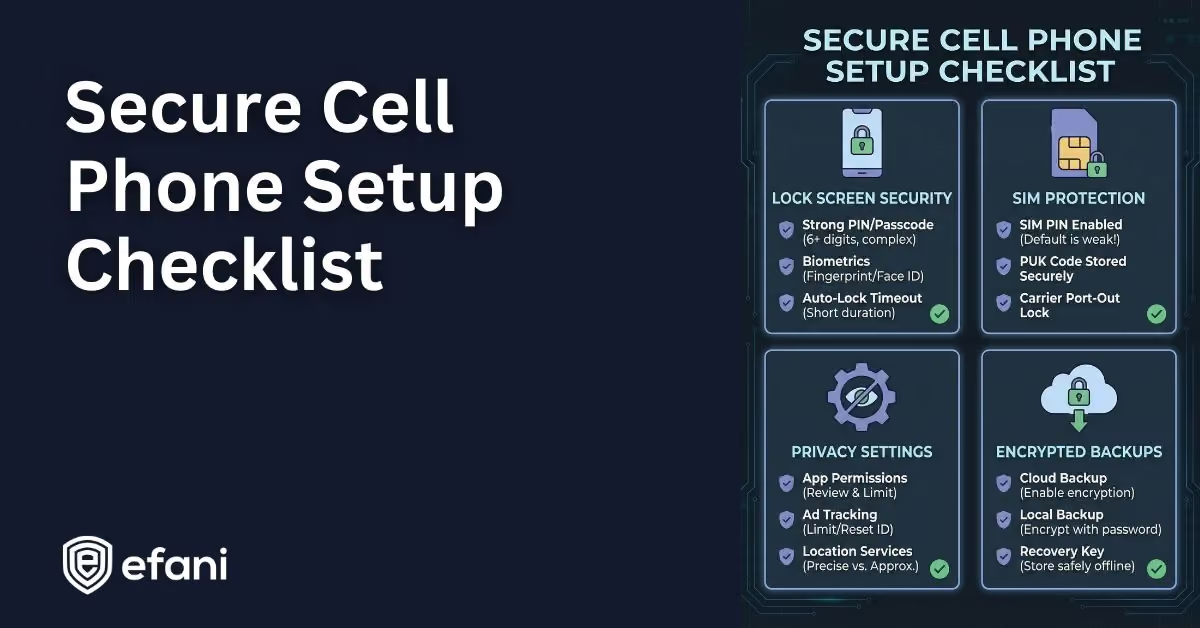
Use A Long Alphanumeric Passcode
Do this before anything else.
On iPhone and Android, switch from a PIN to a custom alphanumeric passcode. Twelve characters or more if you can tolerate it.
Short PINs are fast to brute-force with forensic tools. Long passcodes are not.
If you remember one thing from this article, remember this.
Disable Biometrics When Security Matters
Face ID and fingerprints are convenient. They are not always your friend legally.
In many US jurisdictions, biometrics can be compelled. Passcodes usually cannot.
If you keep biometrics enabled for daily life, learn the emergency shortcut that disables them instantly. On iPhone, holding the side button and volume button does this. On Android, Lockdown mode does the same.
Make this muscle memory.
Enable Stolen Device Protections
On iPhone, turn on Stolen Device Protection and set it to Always, not just familiar locations.
This adds delays and extra checks before critical account changes. It specifically stops the “shoulder surf then steal” attack.
On Android, disable Smart Lock or Extend Unlock features completely. Trusted locations and Bluetooth unlocks are convenience features that attackers love.
SIM And Carrier Security: Stop Number-Based Attacks
Your phone number is still the weakest link for most people.
Change Your SIM PIN
If your SIM supports a PIN, enable it and change it immediately.
Carrier defaults like 1111 or 1234 are public knowledge. Leaving them unchanged does nothing.
Make sure you know how to get your PUK code from your carrier before changing the SIM PIN, just in case you lock it.
Enable Carrier-Level Number Protection
All major US carriers support some form of port protection or number lock.
Turn it on. Leave it on.
This blocks SIM swaps and port-out fraud that lead to account takeovers.
If you want to remove human overrides entirely, carriers like Efani exist specifically for this reason.
Network Settings: Reduce Silent Tracking
Your phone leaks data just by existing on networks.
Wi-Fi Discipline
Turn off auto-join for public Wi-Fi networks.
Audit your saved networks and delete anything you do not actively use.
On newer iPhones, enable Rotate Wi-Fi Address for each network. This stops long-term tracking by cafés, hotels, and offices.
Bluetooth And NFC
Do not rely on Control Center toggles.
If you are not actively using Bluetooth or NFC, turn them off in Settings. Control Center often just disconnects devices while leaving the radio active.
SIM Swap Protection
Get our SAFE plan for guaranteed SIM swap protection.
Operating System Privacy Controls: Use What Already Exists
Modern phones have strong controls. Most people never touch them.
Turn On App Privacy Reports
On iPhone, enable App Privacy Report. On Android, use the Privacy Dashboard.
Check which apps access your mic, camera, location, and network. If something looks weird, remove the app.
Simple rule: a flashlight app should not talk to ad servers.
Disable System Analytics And Location Learning
Turn off things like Significant Locations, routing improvements, and analytics sharing.
Your phone does not need to learn your habits to function.
Keep emergency services enabled. Turn off everything else you do not need.
Monthly
Yearly
Applications: Less Is Safer
Every app is a potential data leak.
Remove Apps You Do Not Trust Completely
If you do not know why an app exists on your phone, delete it.
On Android, carrier-installed apps are a real problem. If they cannot be disabled, they can usually be removed with ADB without rooting.
Fewer apps means fewer permissions and fewer trackers.
Lock Or Hide Sensitive Apps
On newer versions of iOS and Android, you can lock or hide apps.
Use this for messaging apps, password managers, banking apps, and authentication apps.
This is not forensic protection. It is about preventing casual access and shoulder surfing.
Messaging And Accounts: Cut Off Easy Takeovers
Use Secure Messaging By Default
SMS is not secure. Treat it like a postcard.
Use Signal for private communication. Enable registration lock and screen security. Consider disappearing messages by default.
If you want messaging without tying it to your number, Session is an option.
Harden Your Email Account First
Your email controls everything else.
Strong password. No SMS recovery if possible. Authenticator app or hardware key if supported.
If your email falls, the rest follows.
Advertising And Tracking Identifiers: Kill The Shadow Profile
Delete Or Disable Ad IDs
On Android, delete the advertising ID entirely.
On iPhone, turn off “Allow Apps to Request to Track.”
This does not stop all tracking, but it removes the easiest cross-app identifier.
Backups: The Part Everyone Forgets
Your backup is a copy of your life. If it is weak, your phone security does not matter.
iPhone Backups
Turn on Advanced Data Protection for iCloud.
This makes your backups end-to-end encrypted. Apple cannot access them.
If you back up to a computer instead, make sure the backup is encrypted and protected by a strong password.
Unencrypted backups are an open door.
Android Backups
Be careful with cloud backups.
Sensitive files should live locally or in locked folders that do not sync. Understand what is and is not included in your backup before relying on it.
If you cannot afford to lose it, you need to know where it lives.
Emergency And Maintenance Basics
Medical ID And Emergency Info
Set this up so it is visible from the lock screen.
First responders know to look for it. It does not weaken your security.
Reboot Regularly
Once a week is fine. Daily is better.
Many advanced threats live in memory. Rebooting clears them and forces re-entry.
It is simple and surprisingly effective.
Final Reality Check
This checklist does not make you invisible.
Your carrier still knows where you are. Your phone still runs proprietary firmware. Laws are still inconsistent.
What this does is change the math.
It removes easy wins. It blocks common attacks. It raises the cost of targeting you.
For most people, that is more than enough.
A secure phone is about not being careless with the most powerful identifier you carry every day.