
How SIM Swaps Bypass 2FA and Which Authentication Methods Actually Work


Introduction
Two-factor authentication is supposed to be the seatbelt of your online life. But in a SIM swap attack, that seatbelt is often clipped before you even notice the car speeding up.
If you’ve ever wondered how attackers get past 2FA without hacking passwords, this is the missing piece. You’ll see exactly how SIM swaps neutralize common authentication methods, why SMS-based security is fundamentally broken, and which options still hold up in 2025.
Is your cellphone vulnerable to SIM Swap? Get a FREE scan now!
Please ensure your number is in the correct format.
Valid for US numbers only!
The Core Problem: Your Phone Number Is Not Secure
Most people treat their phone number like an ID card. In reality, it behaves more like a hotel keycard.
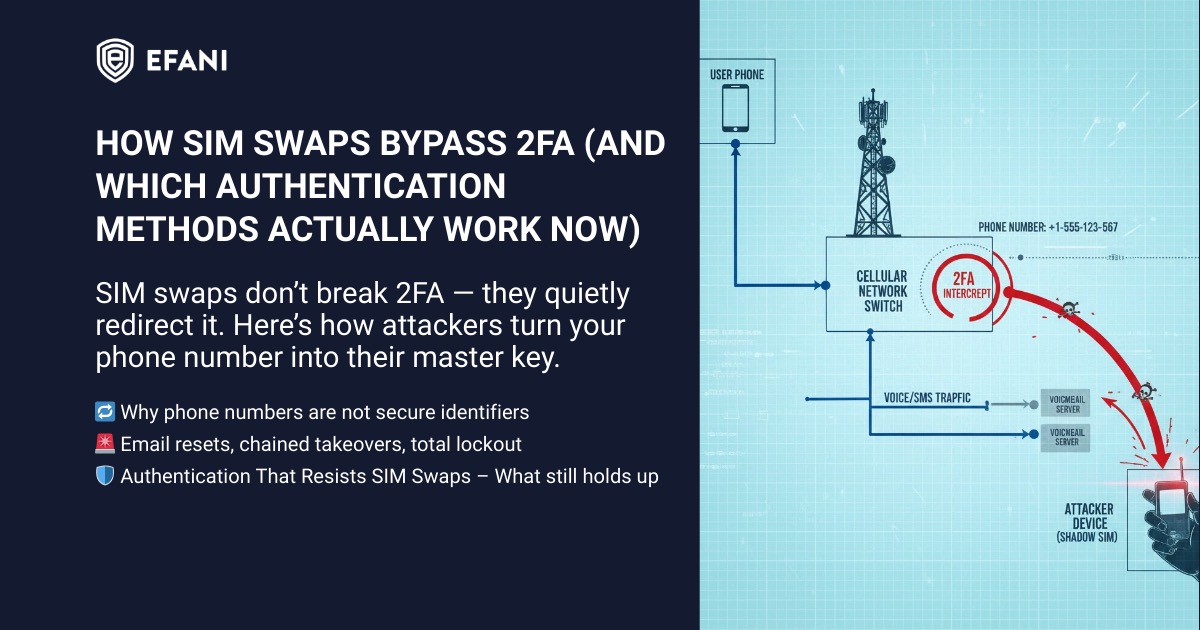
If someone convinces your carrier to reissue it, the old one stops working and the attacker now receives your calls, texts, and verification codes. That’s the entire foundation of a SIM swap scam.
Once an attacker controls your number, 2FA becomes a liability instead of a safeguard.
How SIM Swaps Defeat SMS-Based 2FA
SMS 2FA fails because it assumes one thing that is no longer true: that only you control your phone number.
Here’s what actually happens during an attack:
- An attacker convinces or manipulates a carrier into transferring your number.
- Your phone suddenly loses service.
- Every SMS verification code now lands on the attacker’s device.
- Password resets become trivial.
At that point, SMS 2FA doesn’t slow the attacker down. It confirms their access.
This is why victims often report being locked out of email, banks, and cloud accounts within minutes of losing signal.
Why Account Recovery Makes Things Worse
Even accounts that don’t use SMS 2FA are often still vulnerable.
Many platforms use your phone number as a fallback recovery method.
That means:
- Password reset links get sent via SMS
- Account ownership checks rely on texted codes
- Security alerts go to the attacker instead of you
Once your email is compromised, attackers chain-reset everything else. The phone number becomes the master key.
This is why SIM swap attacks escalate so fast and feel impossible to stop in real time.
SIM Swap Protection
Get our SAFE plan for guaranteed SIM swap protection.
Which 2FA Methods Fail Against SIM Swaps
Not all 2FA is equal. Some methods collapse instantly once a SIM swap happens.
SMS Codes
These fail completely. If your number is stolen, the attacker receives the codes.
Voice Call Verification
Same weakness as SMS. Calls route to the attacker.
Email-Only Verification
Often fails indirectly, because email accounts are usually reset first using SMS.
These methods assume the telecom layer is trustworthy. In a SIM swap scenario, it isn’t.
Monthly
Yearly
2FA Methods That Actually Resist SIM Swaps
Some authentication methods are not tied to your phone number at all. These remain effective even if your SIM is hijacked.
App-Based Authenticators
Apps like Google Authenticator, Authy (non-SMS mode), or Microsoft Authenticator generate codes locally. They do not rely on your carrier.
As long as the attacker doesn’t have your unlocked device, these codes stay out of reach.
Hardware Security Keys
Physical keys such as YubiKeys provide the strongest protection available to consumers.
There is no SMS, no carrier, and no recovery path an attacker can socially engineer over the phone.
Passkeys (Where Properly Implemented)
Modern passkeys tied to secure hardware can resist SIM swaps, provided the account does not allow SMS fallback recovery.
This caveat matters more than most people realize.
The Hidden Weak Point: Carrier Control
Even perfect authentication can be undone if the attacker controls the number tied to account recovery.
This is why SIM swaps are not really an “authentication problem.” They’re a carrier security problem.
If your carrier allows:
- SIM changes without strong verification
- Port-out requests over support calls
- Account access with easily guessed personal data
Then your 2FA strategy is already compromised.
This is the same reason number-level protections and port-out controls are emphasized in guides on how to stop SIM swap fraud in 2025.
Warning Signs That 2FA Is Being Bypassed Right Now
Many victims don’t realize what’s happening until accounts are already gone. Watch for these signals:
- Your phone suddenly shows “No Service” or “Emergency Calls Only”
- Password reset emails you didn’t request
- Login alerts followed by lockouts
- SMS codes arriving after you’ve lost signal
If this pattern looks familiar, the safest move is to assume a SIM swap and act immediately.
What To Change After a SIM Swap
After recovery, many people re-enable the same broken protections. That’s a mistake.
At minimum:
- Remove your phone number from account recovery wherever possible
- Replace SMS 2FA with app-based or hardware authentication
- Lock your number at the carrier level
- Treat your phone number as sensitive infrastructure, not contact info
This is also where secure phone services and stricter carrier controls matter more than switching apps.
The Bottom Line
SIM swaps bypass 2FA because most 2FA was built on a fragile assumption: that phone numbers are stable and private.
They aren’t.
Real protection comes from removing your carrier from the authentication chain entirely and tightening control over who can touch your number in the first place.
If you want to understand the mechanics behind the attack itself, revisit how a SIM swap scam works step by step. If your goal is prevention, focus less on codes and more on controlling the number that delivers them.
FAQs
Can A SIM Swap Bypass 2FA Even If My Password Is Strong?
Yes. A SIM swap does not rely on guessing your password. It works by taking control of your phone number so the attacker receives SMS or voice call verification codes. If your accounts use SMS 2FA or allow phone-number-based recovery, a strong password alone will not stop the takeover.
What 2FA Should I Use To Protect Against SIM Swaps?
Use methods that do not depend on your phone number. App-based authenticator codes (stored on your device) are significantly safer than SMS. Hardware security keys are the strongest option because they are not transferable through a carrier and are resistant to phishing when used correctly. Passkeys can also be strong, but only if you disable SMS fallback recovery wherever possible.
If I Use An Authenticator App, Am I Fully Safe From SIM Swaps?
You’re much safer, but not automatically “fully safe.” SIM swaps mainly defeat SMS and phone-number recovery flows. If your account still allows password resets via SMS, or if your email account can be reset via your phone number, an attacker can still chain their way in. The best setup is: authenticator or hardware key plus hardened recovery options (and minimizing phone number usage for account recovery).
What Are The Most Common Signs A SIM Swap Is Happening?
The big red flag is your phone suddenly losing service with messages like “No Service,” “SOS,” or “Emergency Calls Only” when you know coverage is usually fine. Other signs include unexpected password reset texts or emails, login alerts you did not trigger, and being locked out of email or bank accounts shortly after the service drop.
What Should I Do Immediately If I Think I’m Being SIM Swapped?
Act fast. Contact your mobile carrier using a trusted number or in-person channel and tell them you suspect a SIM swap or unauthorized SIM change. Then secure your email first (because it controls most other account resets), followed by your banking and crypto accounts. Change passwords, revoke active sessions, and switch any SMS-based verification to authenticator or hardware key options as soon as you regain control.


