Think It’s a SIM Swap? Do This in the First 60 Minutes


Introduction
If your phone suddenly lost service and, minutes later, you’re locked out of email, banking, or crypto accounts, you don’t have time to “research.” You have time to act.
A SIM swap is a race. The attacker is trying to reset passwords faster than you can stop them. The first 60 minutes determine whether this ends as an inconvenience or a financial disaster.
This checklist is ordered by impact, not convenience. Follow it top to bottom.
Is your cellphone vulnerable to SIM Swap? Get a FREE scan now!
Please ensure your number is in the correct format.
Valid for US numbers only!
Before You Start: Two Quick Notes
First, take one breath. Not a spa breath. Just enough to keep you from doing random stuff like rebooting your phone 12 times and hoping the universe fixes it.
Second, you are probably going to need a second device. Borrow a phone, grab a laptop, use a tablet, anything. In the first hour, “I don’t want to bother someone” is a luxury you do not have.
If you’re alone and your brain is spiraling, do this: read the next step out loud, do it, then come back and read the next one. This is basically a script for getting control back.
Step 0 (Immediate): Assume It Is a SIM Swap Until Proven Otherwise
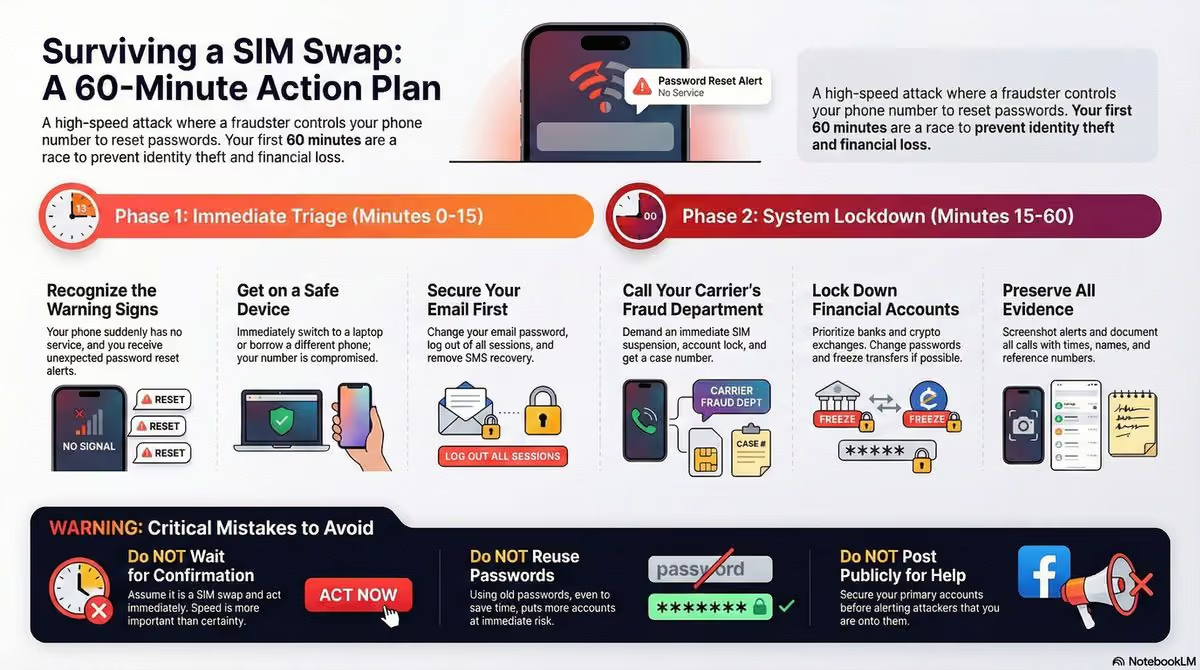
Do not wait for confirmation from your carrier.
If all of these are true, treat it as a SIM swap right now:
- Your phone shows No Service, Emergency Calls Only, or lost signal unexpectedly
- Calls and SMS stopped working while data may or may not work
- Password reset emails or security alerts just appeared
- You were logged out of major accounts without requesting it
You can verify later. Acting late is how people lose accounts permanently.
Step 1 (Minutes 0-10): Get Off the Compromised Phone Number
Do not try to fix this from the affected number.
Do one of the following immediately:
- Use a different phone on a different carrier
- Use a trusted friend or family member’s phone
- Use a laptop on a secure network
From now on, assume SMS and phone calls to your number are controlled by the attacker.
SIM Swap Protection
Get our SAFE plan for guaranteed SIM swap protection.
Step 2 (Minutes 5-15): Lock Down Your Email First
Your email is the skeleton key. If the attacker controls it, they control everything else.
From a safe device:
- Change your email password immediately
- Log out of all active sessions
- Remove SMS-based recovery options
- Switch 2FA to an authenticator app or hardware key
- Check email forwarding rules and recovery addresses
If you can only secure one account in the first 15 minutes, make it your email.
Monthly
Yearly
Step 3 (Minutes 10-25): Call Your Carrier’s Fraud or Port-Out Team
Do not call regular support.
Ask for:
- Fraud department
- Port-out abuse team
- Number takeover escalation
Be explicit:
- Tell them your number was SIM swapped
- Demand an immediate SIM suspension
- Request a port freeze and account lock
- Ask when the SIM change occurred and from where
Document:
- Time of the call
- Agent name or ID
- Case or ticket number
This record matters later if money is stolen.
Step 4 (Minutes 20-35): Secure Financial and High-Risk Accounts
Prioritize accounts in this order:
- Banks and credit cards
- Crypto exchanges and wallets
- Password managers
- Cloud accounts (Apple, Google, Microsoft)
Actions:
- Change passwords
- Disable SMS recovery
- Freeze transfers if possible
- Flag the account as compromised
If you hold crypto or control company accounts, work on the assumption that you were selected rather than swept up. Targeted victims get a second attempt, which is a different problem to solve afterwards.
Step 5 (Minutes 30-45): Check for Silent Damage
Attackers often set traps before you notice.
Review:
- Email rules and filters
- Backup recovery emails or phone numbers
- Account-level API keys or app passwords
- Newly added devices or sessions
Remove anything you do not recognize.
Step 6 (Minutes 45-60): Preserve Evidence
Even if everything seems under control, preserve proof now.
Save:
- Screenshots of service loss
- Security alert emails
- Carrier case numbers
- Bank fraud reference IDs
- Timeline of events
This documentation helps with:
- Bank reimbursement
- Carrier disputes
- Credit bureau issues
- Legal or insurance claims
What Not to Do in the First Hour
These mistakes make things worse:
- Waiting for carrier confirmation before acting
- Trying to “test” SMS or call delivery
- Reusing passwords to save time
- Posting publicly for help before securing accounts
Speed beats certainty here.
If You Cannot Reach Your Carrier
Carrier support can be slow, and sometimes you will hit a wall of hold music right when you need a human. If you cannot reach the fraud team fast, do not stop moving.
Try, in parallel:
- Carrier online chat from a laptop
- A retail store visit with a simple ask: “Fraud escalation for a SIM swap”
- Any account security feature you can toggle in your carrier app
Your goal is not perfect customer service. Your goal is to stop the number from moving while you lock down email and money.
After the First Hour: What Comes Next
Once the bleeding stops:
- Recover and re-secure your phone number
- File formal bank fraud claims if needed
- Harden accounts against future SIM swaps
- Add carrier-level protections and number locks
This incident exposed a structural weakness. The weakness is that a stranger on a support call can move your number, and no PIN you set changes who that stranger has to convince. Closing it properly means moving to a secure mobile service where that decision is not one rep away.
If You’re Reading This After the Damage Is Done
Even if money is already gone or accounts were accessed:
- Act anyway
- Document everything
- Escalate through banks and carriers
- Do not assume it’s “too late”
Many people recover funds because they followed a clear sequence, even hours later.
Quick Reminder
And if money is already gone, the reimbursement fight is separate from the recovery. Efani plans carry $5M SIM swap coverage for exactly the outcome this page is trying to prevent.
FAQs
How Can I Tell If This Is A SIM Swap Or Just A Carrier Outage?
A SIM swap usually comes with account security fallout, not just bad signal. If your phone loses service and you also start seeing password reset emails, login alerts, or you get logged out of key apps, treat it like a SIM swap. Another clue is when calls and texts stop working while other parts of your phone seem fine, or when friends say your number suddenly goes straight to voicemail. Outages do happen, but outages typically do not cause email, banking, or social accounts to start “changing” at the same time.
Should I Restart My Phone Or Remove The SIM Card?
In the first hour, restarting your phone is rarely the fix and can waste precious time. A SIM swap is happening at the carrier level, not because your phone is “glitching.” Removing the SIM can help you stop staring at the signal bars, but it does not stop the attacker from receiving texts and calls if they already moved your number to a different SIM. Your best move is to switch to a safe device and immediately secure your email and financial accounts while you contact your carrier’s fraud team.
What If I Cannot Get Into My Email Because The Attacker Changed The Password?
Go straight to your email provider’s account recovery flow from a safe device and act fast. If you still have access to a logged-in session on a laptop or another device, change the password immediately and log out other sessions. If you are locked out everywhere, recovery is now your top priority because email controls resets for almost everything else. While you are doing recovery, contact your banks and high-risk services to freeze activity, and tell them your phone number may be compromised so they do not rely on SMS to verify you.
What If The Attacker Is Using My Phone Number To Reset My Accounts?
Assume SMS verification is burned until you regain control of the number. Immediately change passwords on critical accounts from a safe device and remove SMS as a recovery or 2FA method wherever possible. Switch to an authenticator app or a hardware key for 2FA, and update recovery options to email addresses and devices you control. Also check for sneaky changes like new recovery emails, new trusted devices, forwarding rules in email, and newly created app passwords. Attackers love “quiet” persistence.
How Do I Prevent This From Happening Again After I Get Control Back?
Once you are stable, do a full “hardening” pass so the same trick does not work twice. Add a strong carrier account PIN, ask for extra verification on SIM changes, and enable any number lock or port-out protections your carrier offers. Then upgrade your account security: stop using SMS for 2FA, use an authenticator app or hardware key, and audit recovery settings everywhere. Finally, change any reused passwords and consider freezing your credit if personal information may have been exposed. The goal is simple: make your phone number less powerful as an attack route.