What Is DNS Filtering, and Do You Need It on Your Phone?


Introduction
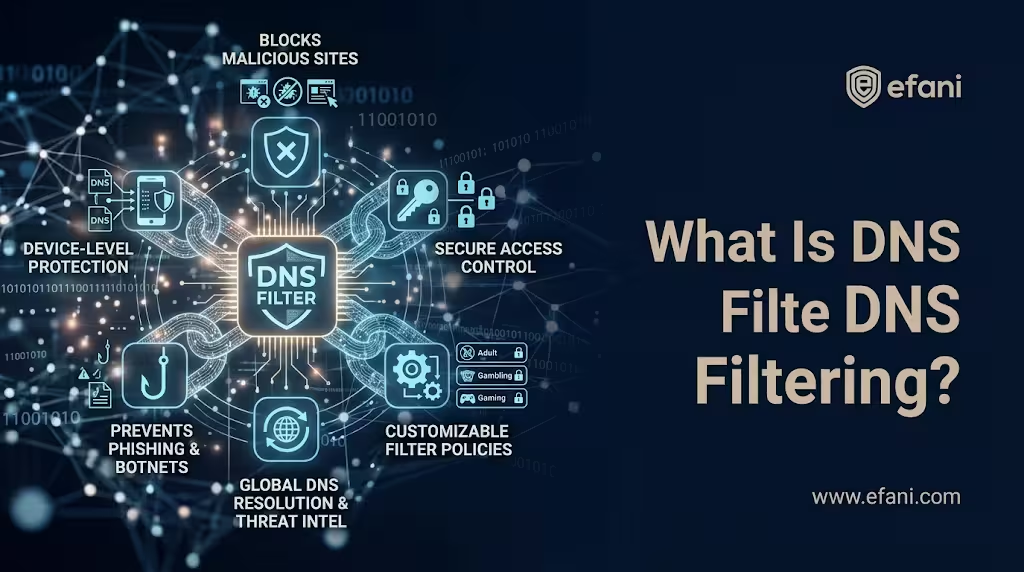
Every time your phone connects to a website or online service, it may first need to determine where that service is located on the internet. That process creates an opportunity to stop certain cyberattacks before a connection to a malicious destination is established. DNS filtering uses this opportunity to block domains associated with phishing, malware, tracking, and other unwanted activity.
The technology addresses a legitimate security problem, particularly as smartphones become central to banking, cryptocurrency management, business communications, and account authentication. According to the Federal Trade Commission (FTC), American consumers reported losing $470 million to scams that started with text messages in 2024, five times the amount reported in 2020. Many of these scams involved links to fraudulent websites designed to steal payment information or credentials, although DNS filtering would not necessarily have prevented every incident.
At Efani, we examine mobile security by looking at what each protective measure actually controls. I consider DNS filtering a useful preventive layer, but its limitations are frequently overlooked. It cannot identify every phishing website, inspect everything an application does, or protect your mobile number from unauthorized carrier changes. It also works differently from a VPN, even though both technologies are frequently advertised as privacy solutions.
Understanding these differences is essential before deciding whether DNS filtering belongs on your phone.
What Is DNS Filtering, and How Does It Work?
DNS filtering is a security technique that evaluates domain name requests against threat intelligence, blocklists, or content policies and prevents selected domains from resolving normally. This can stop applications from connecting to known malicious websites before the usual network connection is established.
To understand how it works, we need to examine the Domain Name System (DNS).
When you enter a website address into your browser, your device typically needs to translate that domain name into an IP address. A DNS resolver performs this lookup, allowing the browser to identify the server it needs to contact.
On a typical mobile connection, the resolver may be supplied by your wireless carrier, Wi-Fi network, or a DNS service configured on the device. A filtering DNS resolver introduces an additional security decision into this process.
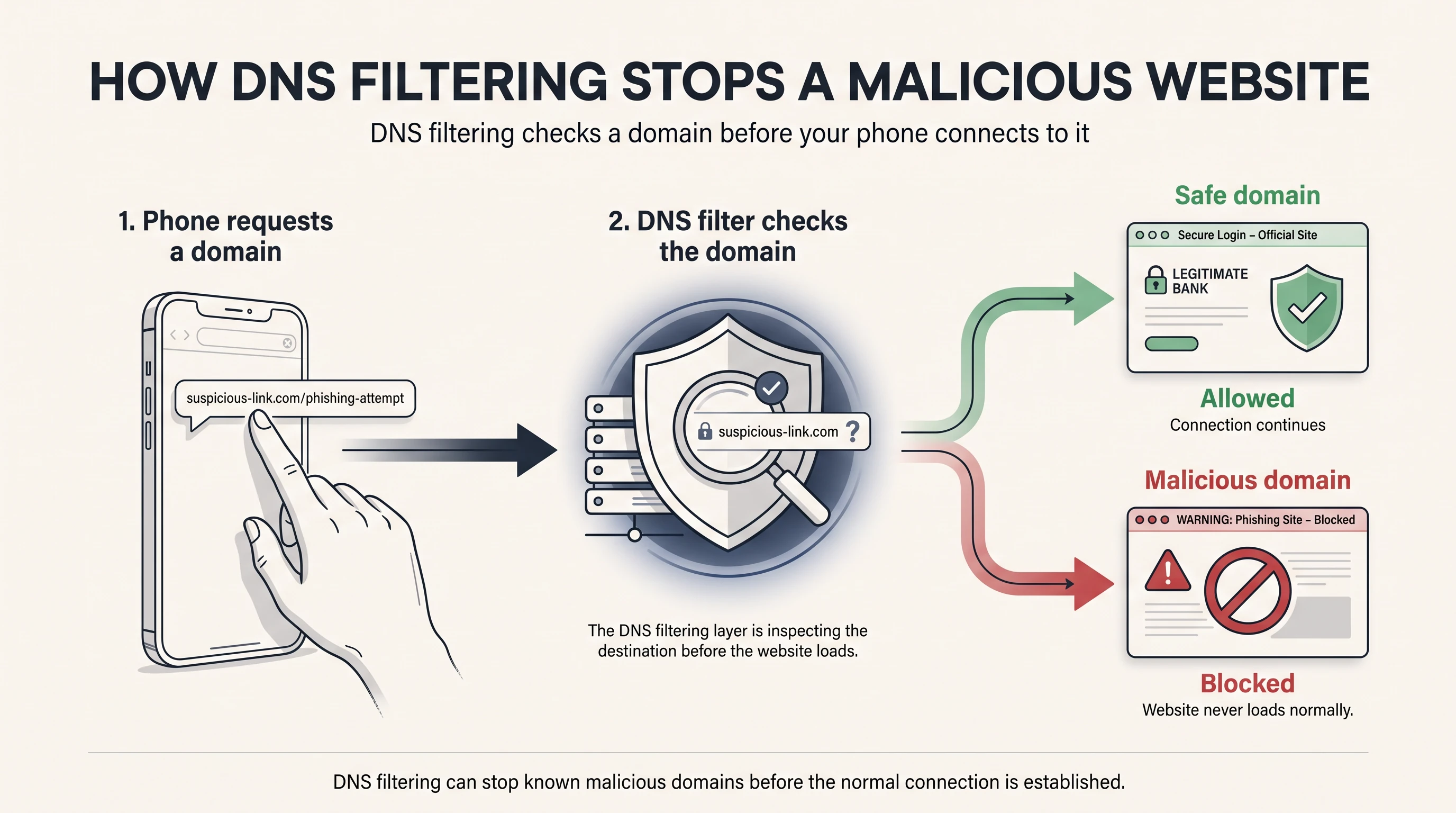
Consider someone receiving a fraudulent text message containing a link to a fake cryptocurrency exchange login page. When the browser requests the domain's IP address, a DNS filtering service checks whether that hostname appears in its malicious-domain intelligence.
If the hostname is permitted under the configured policy, the resolver returns the appropriate DNS response. If it is classified as malicious, the resolver can refuse the request or return a blocking response, preventing the browser from establishing its intended connection.
Depending on the service, the response may be NXDOMAIN, REFUSED, a null address such as 0.0.0.0, or an address associated with a blocking page.
This approach is sometimes called Protective DNS (PDNS), particularly in government and enterprise cybersecurity guidance.
In June 2026, the National Security Agency (NSA) published version 1.5 of its Selecting a Protective DNS Service guidance, emphasizing the importance of evaluating providers based on their security capabilities, threat intelligence, and deployment requirements.
An important limitation is that DNS filtering generally evaluates hostnames rather than individual webpages. For example, it cannot ordinarily distinguish between example.com/legitimate-document and example.com/malicious-download because both addresses use the same hostname.
This becomes significant when attackers host malicious content on otherwise legitimate websites.
Is your cellphone vulnerable to SIM Swap? Get a FREE scan now!
Please ensure your number is in the correct format.
Valid for US numbers only!
DNS Filtering Is Not the Same as Encrypted DNS
DNS filtering is frequently confused with DNS over HTTPS (DoH), DNS over TLS (DoT), and DNSSEC, although these technologies serve different purposes.
A DNS resolver can encrypt requests without providing malicious-domain filtering. Similarly, DNS filtering can operate without encrypted DNS, although encrypted transport is generally preferable.
A well-configured service may combine these technologies, but encryption alone does not determine whether a domain is trustworthy.
What Can DNS Filtering Protect Your Phone Against?
The primary benefit of DNS filtering is reducing exposure to destinations already identified as suspicious or malicious.
The NSA and Cybersecurity and Infrastructure Security Agency (CISA) recognize Protective DNS as a useful security control against phishing, malware distribution, and command-and-control activity.
In a six-month NSA pilot involving Defense Industrial Base networks, more than four billion DNS queries were examined, and millions of suspicious connections were blocked. These figures demonstrate the technology's operational value, although blocked requests should not be interpreted as an equivalent number of successful cyberattacks prevented.
For smartphone users, DNS filtering is particularly relevant to the following threats.
Phishing and Fake Login Websites
Attackers frequently impersonate banks, cryptocurrency exchanges, delivery companies, cloud providers, and other trusted organizations.
Their messages often direct victims to fraudulent websites that imitate legitimate login or payment portals. If a DNS filtering service recognizes the destination as malicious, it may prevent access before the victim submits credentials.
This works particularly well against previously identified phishing infrastructure. Newly created domains and compromised legitimate websites, however, remain significant challenges.
Malware Distribution and Command-and-Control Servers
Some malicious applications contact external infrastructure to download additional components, receive instructions, or transmit stolen information.
DNS filtering can interrupt these communications when they depend on known malicious hostnames. However, blocking a domain does not remove malware already installed on the phone, and malicious software may use alternative communication channels that bypass ordinary DNS resolution.
Advertising and Tracking Domains
Some DNS services maintain blocklists for advertising and analytics infrastructure, potentially reducing tracking requests, unwanted connections, and certain advertisements.
The limitation is that applications can transmit analytics through their own servers or deliver advertisements using the same domains as legitimate content. DNS filtering cannot reliably separate these activities from normal application traffic.
A malware-focused resolver should therefore not automatically be considered a comprehensive advertising or tracker blocker.
DNS Filtering vs VPN: What Is the Difference?
One of the most common misconceptions about DNS filtering is that it provides the same protection as a virtual private network.
Although both technologies can improve security and privacy, their primary functions are different.
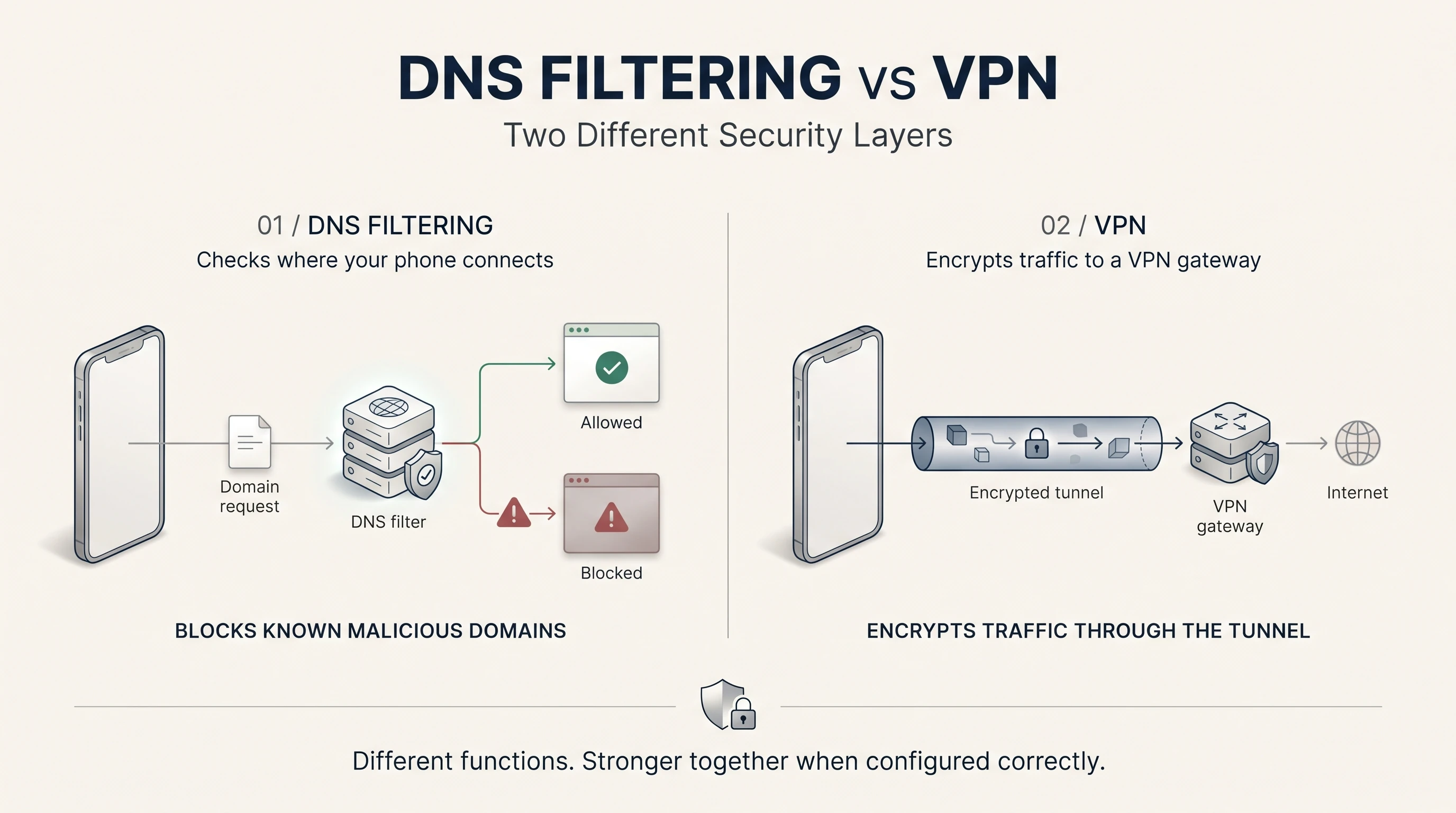
A VPN creates an encrypted tunnel between your device and a VPN endpoint. Traffic routed through that tunnel is protected from ordinary inspection by the local access network, while the VPN provider becomes an additional party you must trust.
DNS filtering operates during domain resolution. Its purpose is to determine whether certain destinations should be accessible, rather than encrypting all internet traffic or changing the public IP address websites observe.
Using both can improve security because the VPN protects traffic transport while the DNS filter restricts selected destinations. However, installing a VPN and DNS filter separately does not guarantee that both remain active.
A VPN may configure its own DNS resolver, replacing the filtering service previously selected on the phone. Split tunneling, application-specific DNS settings, and local VPN-based filtering applications can further complicate how requests are processed.
Apple's Network Extension documentation describes configurations in which VPN DNS settings can become the effective resolver.
For that reason, users should verify which DNS service is processing their requests after enabling a VPN.
Modern HTTPS already encrypts much ordinary web traffic independently of a VPN, so a VPN's additional benefits should be evaluated according to the user's threat model.
DNS Filtering vs Web Filtering
Web filtering is a broader category that can include domain restrictions, URL inspection, content categorization, and malicious-download analysis.
DNS filtering makes decisions using hostnames, while advanced web filtering may examine individual URLs or webpage content when it has sufficient visibility.
For example, a DNS filter generally cannot block example.com/malicious-file while allowing example.com/safe-file if both use the same hostname. A browser security extension or advanced web filter may be capable of distinguishing those resources.
However, HTTPS encrypts URL paths and webpage content. Inspecting that information typically requires an authorized endpoint integration, browser-level capability, or TLS interception, each with additional privacy and administrative considerations.
For most personal smartphones, DNS filtering provides a relatively simple preventive control. Organizations requiring more detailed inspection may need broader web security technologies.
Why DNS Filtering Sometimes Blocks Legitimate Websites
One of the most frustrating problems with DNS filtering is discovering that a legitimate website or application suddenly stops working, even though nothing has changed on the user's device.
These incidents usually involve inaccurate threat intelligence, overly broad policies, or domain classification errors.
Stale Threat Intelligence
A domain may have previously hosted malware or been compromised by an attacker. After the legitimate operator removes the malicious content, the hostname may remain on a threat-intelligence list.
If the filtering provider does not update its classification promptly, users can continue experiencing restrictions long after the original threat has disappeared.
This raises an important question about how frequently providers reassess domains, retire outdated indicators, and correct inaccurate classifications.
Overly Broad Blocking Rules
Some policies restrict entire domain categories or related hostnames rather than individual malicious resources.
This becomes problematic with shared cloud infrastructure, authentication services, content-delivery networks, and websites that rely on multiple third-party integrations.
A broadly blocked domain may affect login systems, payment processing, embedded content, or legitimate application functionality. The DNS filter may technically be enforcing its configured policy while producing an undesirable outcome.
Automated Classification Errors
Providers may use domain age, reputation history, naming patterns, and hosting relationships to identify suspicious destinations.
These signals can improve detection, but legitimate websites sometimes share characteristics with malicious infrastructure. For example, a newly registered business website should not automatically be treated as dangerous simply because its domain was registered recently.
The underlying challenge is balancing aggressive threat prevention with access to legitimate services.
Quad9, for example, publishes procedures for reporting incorrectly blocked domains and investigating false positives. This matters because users need a practical way to distinguish a genuine security warning from an inaccurate classification.
Repeated interruptions can also encourage users to disable protection or create overly broad exceptions, potentially increasing their exposure.
I would not choose a DNS filtering provider simply because it advertises the largest blocklist. Its ability to maintain accurate intelligence, explain blocking decisions, and correct mistakes is equally important.
Why DNS Filtering Still Misses Some Cyberattacks
A DNS filter can correctly block every hostname on its current threat list and still miss an active attack.
That is because domain reputation depends on how quickly threats are identified and whether the relevant network activity reaches the configured resolver.
Newly Created Phishing Domains
Attackers can register domains shortly before launching phishing campaigns, leaving security providers limited time to discover and classify them.
A 2025 research paper, Registration, Detection, and Deregistration: Analyzing DNS Abuse for Phishing Attacks, examined 690,502 phishing domains across a 39-month period.
The researchers found significant differences in detection performance across blocklists and reported that phishing domains remained accessible for an average of approximately 11.5 days after detection.
These findings illustrate the limitations of reactive domain blocking, although the measurements describe the study's dataset rather than every commercial filtering service.
Some providers address this risk through heuristics, including restrictions on newly registered domains and suspicious naming patterns. Such policies can improve coverage but may also block legitimate new websites.
Malicious Content on Trusted Domains
A compromised business website, shared document service, or legitimate hosting platform can contain malicious material while retaining an otherwise trustworthy hostname.
Blocking the entire service may be impractical because it would also prevent access to legitimate resources. This is a fundamental limitation of domain-level filtering rather than necessarily a failure of the provider.
Applications That Bypass System DNS
DNS filtering only evaluates requests that reach the designated resolver.
Some applications use their own DNS-over-HTTPS implementation, cached addresses, hardcoded destinations, or direct IP connections. A malicious application may therefore communicate without performing a lookup through the phone's configured DNS service.
This is why DNS filtering should complement operating-system updates, application permissions, endpoint security, and phishing-resistant authentication rather than replace them.
SIM Swap Protection
Get our SAFE plan for guaranteed SIM swap protection.
How to Enable DNS Filtering on Android and iPhone
Both Android and iPhone support encrypted DNS configurations, although setup procedures and interactions with other networking features differ.
For mobile users, the most important consideration is whether filtering remains active across both Wi-Fi and cellular connections.
How to Enable DNS Filtering on Android
Android has supported a built-in Private DNS feature since Android 9, allowing users to configure an encrypted DNS provider without necessarily installing an application.
On many devices, the process is:
- Open Settings.
- Navigate to Network & Internet or Connections.
- Find Private DNS.
- Select the option to specify a private DNS provider hostname.
- Enter the hostname supplied by your filtering provider.
- Save the configuration and verify that filtering works.
Cloudflare, for example, provides the following DNS-over-TLS hostnames:
The standard 1.1.1.1 resolver is not equivalent to Cloudflare's malware-filtering service, even though both support encrypted DNS.
Google's Android documentation also distinguishes automatic Private DNS behavior from manually specifying a provider hostname. If a manually configured secure resolver becomes unreachable, DNS resolution may fail rather than silently continuing through ordinary unencrypted DNS.
Actual behavior can vary with Android-derived operating systems, manufacturers, and VPN configurations.
How to Enable DNS Filtering on iPhone
Apple supports DNS over HTTPS and DNS over TLS through system networking configurations.
Individual users can typically enable a filtering service through a provider-supplied configuration profile or compatible application.
Enterprise administrators have additional deployment options through device-management frameworks. With iOS 27, Apple deprecated its older managed DNSSettings payload in favor of a declarative DNS management configuration.
The important distinction for ordinary users is that manually changing DNS servers for one Wi-Fi network does not automatically provide equivalent filtering on cellular data.
A properly configured device-level solution is generally more suitable for users who move frequently between networks.
Does iCloud Private Relay Interfere?
Apple's iCloud Private Relay changes how supported browsing traffic and associated DNS activity are handled.
Depending on the device configuration, Private Relay can affect which resolver processes certain requests. However, it does not universally bypass every content-filtering application, and Apple documents different interactions involving VPNs and Network Extensions.
Rather than automatically disabling Private Relay, users should verify their effective DNS filtering configuration.
We recommend checking filtering on home Wi-Fi, cellular data, and with any separate VPN enabled. Provider-supplied diagnostic pages and harmless test domains are preferable to visiting genuinely malicious websites.
Pi-hole vs Managed DNS Filtering: Which Is Better for Phones?
Users who want greater control over DNS filtering frequently consider Pi-hole, an open-source, self-hosted platform that can run on a Raspberry Pi, Linux server, or compatible virtual machine.
Pi-hole allows administrators to choose blocklists, inspect DNS activity, and manage filtering across devices that use it as their resolver.
For home networks, this can be an effective way to restrict advertising and tracking domains without configuring individual applications.
However, its main limitation for mobile users becomes apparent when they leave home.
A Pi-hole server configured only on a home network generally stops protecting a phone when that device switches to cellular data.
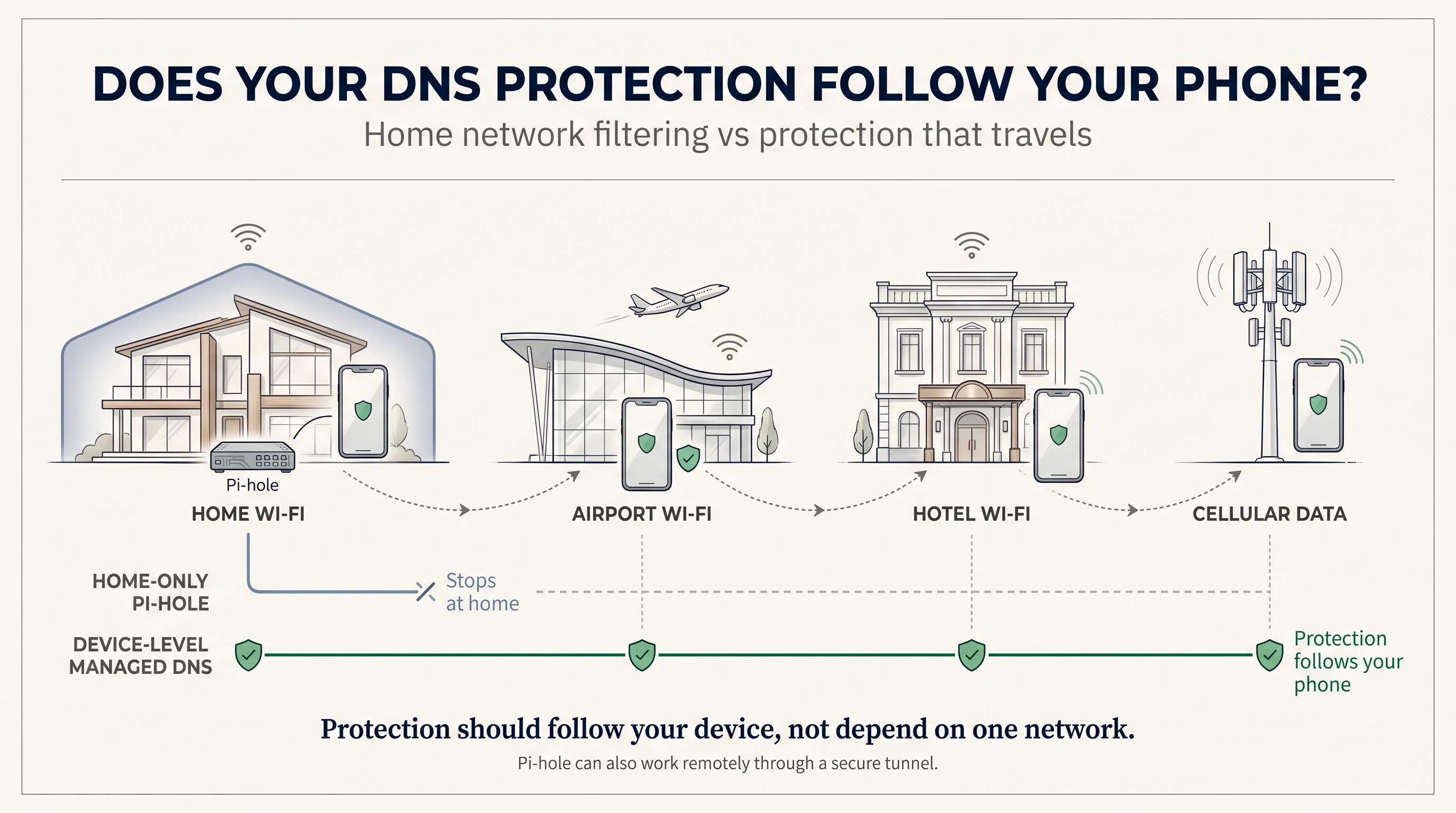
Remote filtering is possible through a securely configured tunnel, such as WireGuard or Tailscale. Pi-hole's official WireGuard documentation explains how authorized devices can access a private DNS filtering server remotely.
This approach offers control but requires ongoing maintenance, secure remote connectivity, and attention to resolver availability. Users should also avoid exposing an unrestricted DNS resolver to the public internet.
Managed DNS filtering services offer a different model. Providers such as Quad9, NextDNS, Cloudflare, AdGuard DNS, and Control D operate remote infrastructure that can be accessed through supported device-level configurations.
Depending on the service, users may receive malicious-domain filtering, custom policies, reporting, tracker blocking, and protection across networks without maintaining their own server.
For executives and frequent travelers, I generally favor a reputable managed DNS service because maintaining consistent protection across networks is often more valuable than the flexibility of self-hosting.
Pi-hole remains a reasonable choice for technically capable users who want greater infrastructure control and are prepared to maintain secure remote access.
Neither approach is inherently more secure in every environment.
Monthly
Yearly
How to Choose a DNS Content Filtering Service
Choosing a DNS content filtering service involves more than comparing the number of domains on its blocklist.
Providers differ significantly in their objectives. Quad9 focuses on malicious-domain protection, while Cloudflare offers predefined malware and content-filtering configurations. NextDNS, AdGuard DNS, and Control D provide varying degrees of customization, reporting, and privacy-oriented filtering.
For high-risk users, I recommend evaluating five characteristics:
- Threat coverage: Does the service prioritize phishing, malware, command-and-control infrastructure, trackers, or broader content categories?
- False-positive handling: Can incorrect classifications be investigated and corrected promptly?
- Mobile compatibility: Will filtering remain active across cellular networks, Wi-Fi, and existing VPN configurations?
- Privacy: What DNS information does the provider collect, retain, or associate with individual users?
- Reliability: What happens when the resolver becomes unavailable?
The privacy question deserves particular attention.
A DNS filtering provider can observe the queries its resolver processes, potentially revealing information about the applications and services a device uses. Encrypted DNS protects these requests in transit, but the resolver itself still processes the requested hostnames.
For individuals handling sensitive business, financial, legal, or journalistic communications, logging policies and retention practices should be part of the security evaluation.
A free malware-blocking resolver may be sufficient for basic protection, while paid services may justify their cost through customization, reporting, or administrative controls. Higher pricing does not automatically establish better security.
DNS Filtering for Schools and Organizations
Schools and organizations also use DNS filtering to restrict inappropriate content, reduce malicious website exposure, and enforce network policies.
In the United States, the Children's Internet Protection Act (CIPA) establishes relevant filtering and internet-safety requirements for certain schools and libraries receiving qualifying E-rate support. DNS filtering can contribute to these protections, but deploying a DNS filter alone does not establish compliance.
The same mobile deployment challenge applies to corporate fleets and family-managed devices. Policies enforced only through an office or home network may no longer apply when those devices leave that environment.
Do You Really Need DNS Filtering on Your Phone?
For most smartphone users, enabling a reputable malicious-domain filtering service is a sensible additional precaution, especially when it can be configured without disrupting normal activity.
Its value increases for individuals who frequently access unfamiliar links, manage sensitive accounts, or face elevated phishing and impersonation risks.
However, additional filtering may be unnecessary if an existing security application, enterprise management platform, or VPN already provides equivalent protection. Adding another DNS service can create configuration conflicts without meaningfully improving coverage.
For high-risk individuals, including executives and cryptocurrency holders, DNS filtering should be considered alongside stronger device security, account authentication, and mobile-number protection.
At Efani, our work focuses on another part of this security architecture: protecting mobile identity and the processes through which a telephone number can be reassigned.
A DNS filter may prevent a connection to a known phishing domain, but it has no direct authority over SIM replacements, unauthorized porting requests, or carrier-account recovery decisions.
Our secure mobile-service approach is designed to introduce stronger verification and administrative safeguards around those sensitive processes.
I see these protections as complementary. DNS filtering reduces exposure to certain malicious destinations, while carrier-level safeguards address attempts to take control of the mobile number itself.
For someone whose phone number is connected to banking, cryptocurrency exchanges, business systems, and account recovery, protecting only one part of that relationship leaves other important risks unresolved.
A stronger approach combines DNS filtering with device hardening, phishing-resistant authentication, secure account recovery, and appropriate financial or cryptocurrency custody controls.
Frequently Asked Questions
Does DNS filtering slow down your phone?
DNS filtering adds a policy evaluation to domain resolution, but the performance impact is often modest. Actual responsiveness depends on resolver latency, caching, network conditions, and provider infrastructure. A faster resolver may improve some lookup times, but enabling filtering does not guarantee faster browsing.
Can I use DNS filtering and a VPN together?
Yes, provided their configurations are compatible. Some VPNs include DNS filtering, while others replace the device's configured resolver. Verify which service handles DNS requests after activating the VPN.
Is DNS filtering enough to protect against phishing?
No. It can block recognized malicious domains, but newly created phishing sites, compromised legitimate websites, and social engineering that does not involve a malicious domain may bypass it. Phishing-resistant authentication remains important.
Is Private DNS the same as DNS filtering?
No. Private DNS generally refers to encrypted DNS transport or a configured resolver. DNS filtering requires an actual security or content policy. Encryption alone does not block malicious destinations.
Conclusion
DNS filtering is a useful preventive security measure because it can interrupt connections to recognized malicious domains before the usual network connection is established.
Its effectiveness depends on accurate threat intelligence, the traffic it can inspect, and whether the configuration remains active across different networks. Overly aggressive policies can disrupt legitimate services, while newly created malicious domains and applications that bypass system DNS may escape detection.
For most smartphone users, I believe a reputable, correctly configured DNS filtering service is worth considering. For executives, cryptocurrency investors, and other high-risk individuals, it should be one component of a broader mobile security strategy that includes strong authentication, hardened devices, appropriate network protection, and secure carrier-account safeguards.
The objective is to reduce the opportunities available to an attacker and prevent a compromise in one security layer from exposing everything connected to your digital identity.