
Secure Cell Phones: Complete Guide & Glossary (2026)


Introduction
You are in the checkout line at a grocery store when your phone buzzes. A new login to your bank from a device you do not recognize. Then another notification. A withdrawal you did not make.
- You try to open your banking app. You are logged out.
- You request a password reset. The code never arrives.
- You glance at the top of your screen and realize your phone quietly flipped to “SOS only” ten minutes ago.
Nothing feels “hacked” on the phone itself. No weird apps. No obvious malware. What got hit was the thing everything else hangs on in 2025. Your mobile number.
That is the reality this guide is written for. A “secure cell phone” in 2025 is not just a fancy encrypted device. It is the combination of:
- A hardened device and operating system
- A carrier or secure cell phone service that does not hand your number to criminals
- The way you configure and actually use that phone day to day
Efani exists on the service side of that equation.
This guide will help you decide what you need on the device side, where your gaps are, and how to harden your setup so one SIM swap or phishing text does not ruin your week.
Is your cellphone vulnerable to SIM Swap? Get a FREE scan now!
Please ensure your number is in the correct format.
Valid for US numbers only!
What A Secure Cell Phone Means In 2025
Most people think “secure phone” means “expensive phone with Face ID and a long passcode”. That is the bare minimum now.
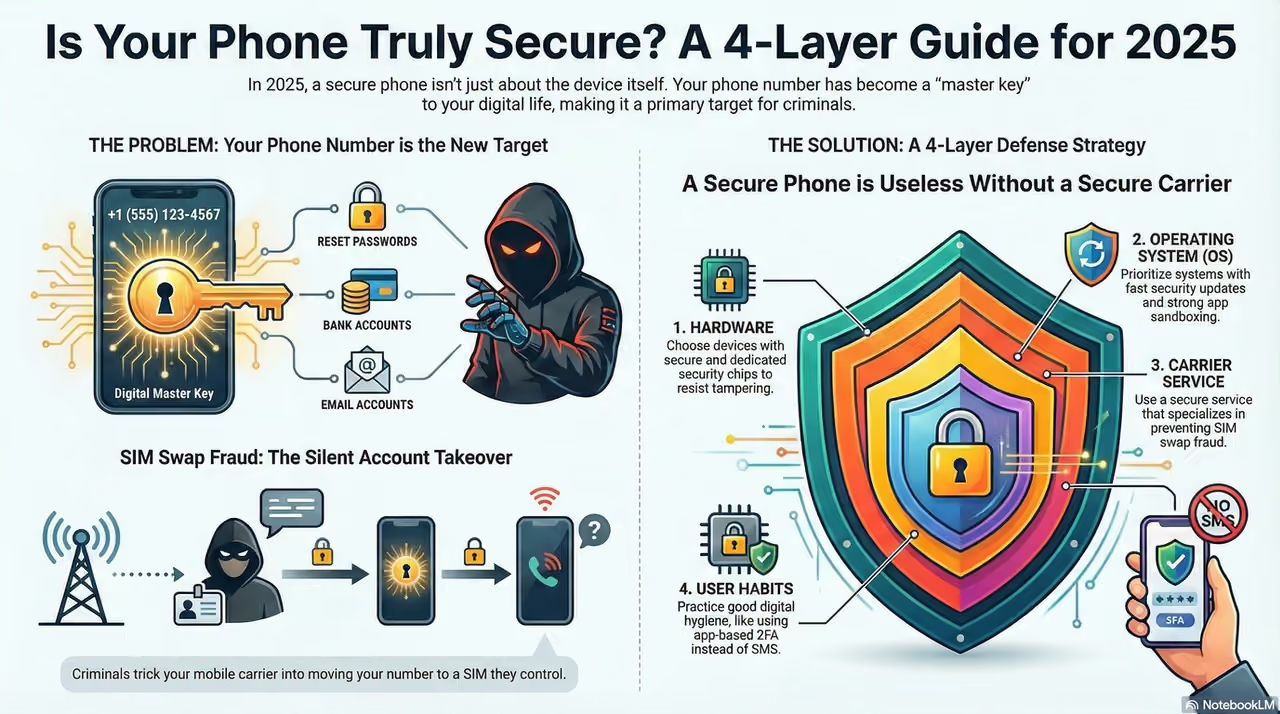
In 2025, when we talk about a secure cell phone, we are really talking about four layers that work together:
- Hardware security Secure boot, dedicated security chips, hardware backed encryption, and in some cases physical kill switches for radios and sensors.
- Operating system security How fast the device gets patches, how hard it is to exploit, how strong the sandboxing and permission controls are.
- Network and carrier security How easily your number can be ported out or SIM swapped, how your traffic moves over the network, and what protections your service has in place.
- User behavior and configuration Lock screen policy, app choices, how you handle links and codes, and whether you treat SMS as “secure” even though it is not.
You do not have to be perfect in all four layers. But if your phone is secure while your carrier throws away identity checks, your number is still a soft target.
That is how SIM swap fraud and account takeovers happen to very normal people.
Why Your Threat Model Matters For Phone Security
“Threat model” sounds like a consultant word, but it just means answering three questions honestly:
- What do I have that someone might want
- Who might realistically come after it
- How much damage would it cause if they got in
For most Efani customers, it is less about spies and more about money and leverage:
- Everyday professionals Targeted for SIM swap fraud, bank account takeovers, and access to email or cloud accounts that can be used to reset everything else.
- Small business owners and founders Targeted for payroll fraud, access to corporate email, and abuse of SaaS accounts that are secured with SMS codes.
- High profile individuals Executives, investors, creators, and public figures targeted for both money and leverage. Compromised accounts can move markets, leak private messages, or be used for public extortion.
Once you admit your phone number is effectively your “master key”, secure phones stop being a nerd hobby and become basic risk management.
Why Mobile Attacks Are Worse In 2025
If you still think cyber attacks start with a sketchy email attachment, you are behind. Modern attacks are tuned for phones first.
A few trends that matter for your secure cell phone decisions:
- Zero click exploits Some of the most advanced spyware does not need you to tap anything. A crafted message or call hits a vulnerability and the device is infected without obvious signs. That is why architectural security and fast patching matter so much.
- Phishing and smishing on every channel Attackers do not just email. They DM, text, and even call pretending to be your bank or carrier. Often the goal is simple. Make you share a one time code or approve a login.
- SIM swap and number based attacks Criminals talk to your carrier, convince a support rep they are you, and move your number to a SIM they control. Now every SMS code, password reset email, and “verify this login” prompt lands in their pocket.
- Supply chain and network level risk From shady firmware in cheap phones to fake “free Wi Fi” portals that strip your credentials, the infrastructure behind your phone is a target on its own.
You cannot fully control the global threat landscape.
You can choose a phone, operating system, and secure phone service that are built for this level of abuse instead of the 2015 world where SMS 2FA looked clever.
SIM Swap Protection
Get our SAFE plan for guaranteed SIM swap protection.
Secure Cell Phone Hardware Foundations
A secure cell phone starts with a hardware foundation that is built to resist tampering and protect secrets if the device is lost, stolen, or attacked.
Key concepts that actually matter when you choose a device:
- Secure boot and verified boot The phone verifies each stage of its own startup using cryptographic signatures. If something in the boot chain is modified, the device refuses to run it. This makes it dramatically harder to install low level malware that survives resets.
- Dedicated security chips and secure enclaves Many modern phones include a separate security chip that stores keys and handles sensitive operations. Even if the main operating system is compromised, extracting biometric templates or decryption keys from this chip is very difficult.
- Trusted execution environments Certain operations run in an isolated environment inside the processor. Things like biometric matching or key handling happen in that protected space instead of the main operating system where malware might live.
- Hardware kill switches and modem isolation Privacy focused devices like the Librem 5 family take things further with physical switches that cut power to the modem, Wi Fi, and microphone. Some designs even keep the modem on a separate board so baseband level attacks have less reach.
- Post quantum ready cryptography A growing number of vendors are beginning to roll out algorithms that stay secure even if large scale quantum computers become practical. For most consumers it is early, but for long lived sensitive data this is not science fiction anymore.
You do not need every feature on that list, but you should at least understand what your current phone does not have.
Monthly
Yearly
Secure Cell Phone Operating Systems And Software
Hardware is the skeleton. The operating system is the nervous system. That is where most attacks actually land.
Broadly, your choices fall into three buckets.
1. Hardened Android With Security Focus
Projects like GrapheneOS or other hardened Android builds take stock Android and strip it down for security and privacy. They typically:
- Add strong exploit mitigations and stricter sandboxes
- Give you granular control over app permissions, network access, and sensors
- Remove or restrict big vendor services that collect data
In practice, this usually runs on specific hardware such as recent Google Pixel devices, because those phones expose the right hooks for verified boot and hardware security chips. The result is a very locked down experience that is attractive for power users and high risk individuals.
The tradeoff is app compatibility. Some banking apps, wallet apps, and corporate tools expect a stock environment and may complain or refuse to run on hardened custom builds.
2. Privacy Focused Yet User Friendly Android Variants
There are also privacy centric Android builds that aim for a middle ground. They still care about encryption and safer defaults, but they allow more compatibility with mainstream apps and services.
These can be a good step up if you care about privacy and do not want to live with the stricter limitations of a maximalist build.
3. Mainstream Flagships With Strong Built In Security
Modern flagship devices from Apple and major Android vendors are much more secure than older generations. You get:
- Strong hardware backed encryption
- Regular security updates for several years on supported models
- Built in features for secure enclave style processing and sandboxed apps
For most “I am not a spy but I really do not want to be SIM swapped and drained” users, a recent flagship iPhone or Pixel, properly configured, plus a secure cell phone service, is already a massive upgrade over an older, unpatched phone with a big carrier plan.
The Compatibility And Convenience Tradeoff
There is a simple rule you should accept up front.
- The closer you move toward maximum security and open source transparency, the more friction you will hit with mainstream apps.
- The more you prioritize “everything just works”, the more you will rely on the vendor and ecosystem to get security right on your behalf.
For some people, having a hardened operating system and accepting that a few apps will misbehave is worth it. For others, sticking to a mainstream iPhone or Android build and focusing on configuration and carrier security is the realistic way to reduce risk fast.
There is no one right answer. There is only the setup that matches your threat model and tolerance for inconvenience.
How To Choose The Right Secure Cell Phone Setup
Use this as a practical starting point, not a rigid prescription.
If you are a typical professional or small business owner
- Use a recent flagship iPhone or Pixel that still receives security updates
- Turn on full disk encryption and a strong passcode
- Use end to end encrypted messaging for anything sensitive
- Move critical accounts away from SMS based two factor where possible
- Upgrade to a secure cell phone service like Efani so your number is not protected only by a tired call center agent
If you handle sensitive financial assets such as crypto or run a high risk business
- Consider running a hardened Android build on a supported Pixel as your primary or secondary “clean” device
- Keep that device as free as possible of social media and random apps
- Use hardware keys or app based authenticators rather than SMS where sites allow it
- Pair it with a secure phone service that takes SIM swap seriously, not as a checkbox
If you are a journalist, activist, or public figure under targeted scrutiny
- Maintain at least two devices
- A hardened, privacy first device with minimal apps
- A more mainstream device for everyday friction filled services
- Use hardware kill switches and modem isolation where possible when traveling or meeting sources
- Assume your number is a prime target and treat secure service selection as non optional
The pattern is always the same. Device, operating system, and carrier all matter at the same time.
See which phones top our 2026 Most Secure Phones list.
Why Secure Cell Phone Service Matters As Much As The Device
You can have the most hardened, boutique, privacy centric phone on earth and still lose everything if a criminal can convince your carrier to move your number to their SIM.
A standard consumer carrier is optimized for support speed and sales, not for resisting social engineering from professional fraudsters. The result is the classic SIM swap story.
- Attacker gathers your basic info from breaches and social media
- Attacker calls your carrier and claims your phone was lost or damaged
- Support rep is rushed, follows weak verification steps, and activates a new SIM for the attacker
- Your phone drops to “no service” while the attacker receives your SMS codes, password resets, and account alerts
A secure cell phone service is built specifically to resist that flow. It layers in stronger identity verification, strict internal processes, and human checks for suspicious activity instead of handing your number over because someone knew your last four digits.
That is the problem Efani was created to solve. We do not manufacture your phone. We make sure your number and SIM security are treated like the critical asset they actually are in 2025.
Secure Cell Phone Setup Checklist
After you pick your device and carrier, here is a straightforward hardening checklist you can work through in an afternoon.
- Turn on a long passcode and disable simple patterns or four digit pins
- Enable full device encryption if it is not already on by default
- Turn on automatic security updates and actually install them
- Remove apps you have not used in the last 30 days
- Review app permissions and cut off access to location, microphone, and camera where it is not essential
- Use an end to end encrypted messaging app as your default for sensitive chats and calls
- Switch critical accounts to app based authenticator codes or hardware keys where supported
- Turn off “SIM toolkit” or remote management features you do not use
- Disable automatic connection to open Wi Fi and remove saved networks you do not trust
- Make sure you can remotely locate and wipe your device if it is lost
- Move your number to a secure cell phone service that focuses on SIM swap prevention
You do not need to finish every item in one sitting. But every box you tick shifts the odds in your favor.
Operational Security Habits That Actually Matter
The best hardware and operating system still lose to sloppy habits. A few high impact rules are worth committing to.
- Treat SMS as insecure for anything sensitive Codes over SMS are convenient for attackers. Prefer app based or hardware factor where possible.
- Never share one time codes on a call Banks and carriers do not need you to read codes back to them. If someone asks, hang up and call the official number on the website.
- Be suspicious of urgency Most attacks lean on “do this now or you lose access”. Slow down, verify the channel, and log in manually instead of tapping links.
- Avoid using public Wi Fi for sensitive logins If you must, pair it with a trusted VPN. Safer still, use your cellular data on a secure service.
- Keep work and personal life separate Consider a dedicated device or at least strict profile separation for work accounts and high value admin access.
These are habits, not hacks. Over time they become automatic.
Conclusion
If you take nothing else from this guide, let it be this. Your phone number is now one of the most powerful keys to your digital life. A secure cell phone in 2025 means picking the right device, locking it down intelligently, and pairing it with a carrier that refuses to hand that key to anyone who asks nicely.
FAQs
Do I Really Need A Secure Cell Phone If I Am Not Famous
Yes. Criminals go after easy money, not celebrity status, and all they need is access to a bank account, a cloud email account, and the phone number tied to both; which describes almost everyone. A secure cell phone setup does not make you invisible, but it makes you a far more expensive target than the next person in line.
Is iPhone Or Android Better For Security In 2025
Both can be secure if you pick a recent model, keep it patched, and configure it properly. iPhone offers strong defaults and a tightly controlled ecosystem, while Android offers more flexibility, including hardened open source options, but also more ways to misconfigure your device. For non-technical users, a recent iPhone combined with a secure cell phone service and sensible habits is a very safe, low-friction setup.
Can A Secure Cell Phone Stop SIM Swap Attacks
A secure phone alone cannot prevent a SIM swap because the attack targets your carrier’s identity checks, not the hardware itself. What the device can do is reduce the blast radius by making it harder for attackers to escalate to full device compromise and by protecting local data even if they breach your accounts elsewhere. To truly lower your SIM swap risk, you need a secure cell phone service that treats number security as a mission, not a checkbox; this is exactly where Efani fits in.
What Is The Easiest First Step To Secure My Phone
If you want quick impact, start by setting a long, unique passcode, enabling automatic updates, moving your number to a secure cell phone service that blocks SIM swap attempts, and using end-to-end encrypted messaging for anything sensitive. Once those basics are in place, you can gradually harden the device further with more advanced settings and better hardware choices.


