
How To Check If Your Phone Is Unlocked and Ready To Use


Introduction
Your phone might look sleek, powerful, and expensive, but here is the catch: if it is locked to a single carrier, you are tied down. You cannot just pop in another SIM and go abroad, switch to a better plan, or hand it off to a friend who uses a different network.
Knowing whether your device is unlocked is one of those basic checks that saves you from embarrassment at the airport or from wasting money on a phone you cannot use freely.
Quick Answer
Power off your phone, insert a SIM card from a different carrier, and power it back on. If you can make a call or use mobile data, your phone is unlocked. If you see "SIM Not Supported" or a prompt for an unlock code, it's locked.
No spare SIM? On iPhone: Settings > General > About > Carrier Lock "No SIM restrictions" means unlocked. On Android: Settings > Connections (or Network & Internet) > Mobile Network > Network Operators, if you can select more than one carrier, it's unlocked.
Is your cellphone vulnerable to SIM Swap? Get a FREE scan now!
Please ensure your number is in the correct format.
Valid for US numbers only!
What Does “Unlocked” Phone Mean?
Before diving into steps, it helps to clarify the term. A locked phone is restricted by software so it only works with the carrier that sold it to you. Think of it like buying a car that can only be driven on one company’s fuel.
An unlocked phone, on the other hand, works with SIM cards from multiple carriers. That means freedom to switch networks, use local SIMs when you travel, or resell your phone without limitations.
Carriers often lock phones because they subsidize the cost. You got the phone cheaper upfront, so they bind you to their network until your contract or payment plan is over. Unlocked phones usually cost more upfront, but you get total flexibility.
How To Check If Your Phone Is Unlocked
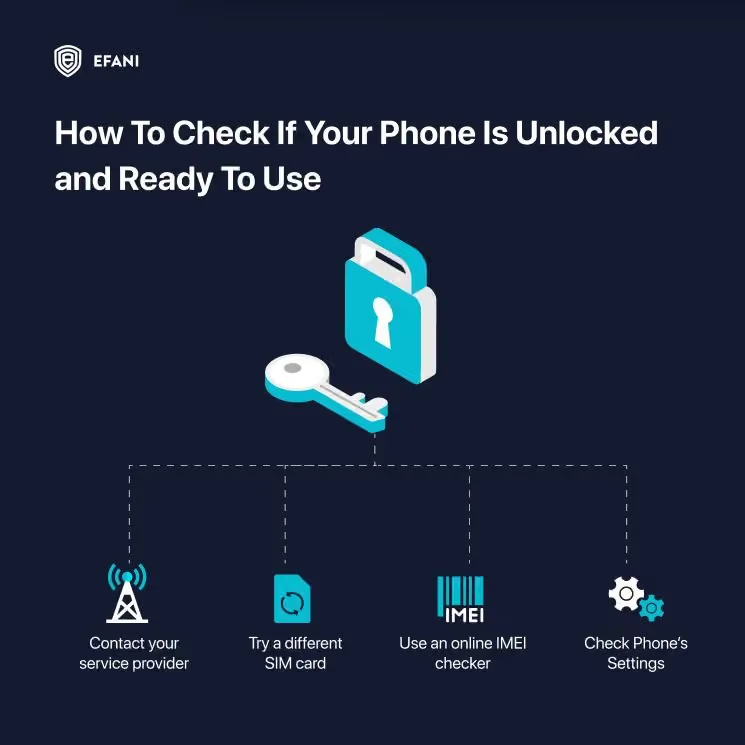
You have multiple ways to check, and the choice depends on what you have in hand: the device itself, a spare SIM card, or access to your carrier account. Here are the most reliable methods.
1. Swap In Another SIM Card
The fastest way to check if your phone is unlocked is to simply try a SIM from another carrier.
- Power off your phone and remove your current SIM.
- Insert a SIM card from a different carrier.
- Power back on and try to make a call or use mobile data.
If you can make a call, send a text, or browse online, your phone is unlocked. If you get an error like “SIM not supported” or “Enter SIM unlock code,” the phone is locked.
This is the most foolproof test because it cuts through menus and settings. The device either connects or it does not.
2. Check In Your Phone’s Settings
If you do not have another SIM handy, your phone’s settings can offer clues.
On iPhone:
- Go to Settings > General > About.
- Scroll down to “Carrier Lock.”
- If it says No SIM restrictions, your iPhone is unlocked.
- If it shows a specific carrier, your phone is locked.
On Android (varies by model):
- Go to Settings > Connections or Mobile Networks.
- Look for Network Operators or Carrier.
- If you can see and select multiple carriers, your phone is likely unlocked.
- If you cannot choose or it forces one carrier, it is probably locked.
Android menus vary, so this is less reliable than the SIM swap test. Still, it gives you a quick check.
3. Use Your Carrier’s Website Or Support
Most carriers let you check your phone’s lock status online. You usually enter your IMEI number, which is the unique identifier for your device.
- Dial *#06# on your phone to see the IMEI.
- Go to your carrier’s support site or account portal.
- Enter the IMEI to check if the phone is locked or eligible to be unlocked.
If you cannot find a direct tool, call your carrier’s customer support. Ask them straight: “Can you confirm if my phone is unlocked?” They can check instantly.
4. Look At The Phone’s Purchase Details
Sometimes the easiest answer is hiding in the paperwork. If you bought your phone directly from the Apple Store, Google Store, Samsung, or an official unlocked retailer, your device is almost always unlocked out of the box.
If you bought it from a carrier on contract, odds are it was locked until you finished payments. Many carriers will automatically unlock your phone once the balance is clear, but you may need to request it.
5. Check The IMEI With A Third-Party Tool
There are online IMEI checkers that claim to reveal lock status. Some are free, others charge a small fee. While these can be helpful, be careful.
Stick with reputable sources and avoid shady sites that may collect your IMEI for scams. The most trustworthy route is always through your carrier or manufacturer.
What To Do If Your Phone Is Locked
Getting a phone unlocked is usually free, but the process (and the wait) depends on your carrier.
- Check eligibility first. Most US carriers require the device to be paid off in full, active on an account in good standing, and not reported lost, stolen, or tied to fraud.
- Request the unlock directly from your carrier.
- AT&T - Submit a request through AT&T's online device unlock portal; requests are typically processed within a few business days once eligibility is confirmed.
- T-Mobile - Submit through the T-Mobile unlock app or account portal; postpaid devices are generally eligible once paid off, prepaid devices after a minimum active-service period.
- Verizon - Verizon ships most phones unlocked by default and auto-unlocks postpaid devices after a set period of active, good-standing service.
- Use a local repair shop or third-party unlock service as a fallback. This usually costs a small fee (commonly cited in the $10-$30 range, varies by shop) and takes minutes rather than days - but check reviews first, since unlock scams exist.
- Once unlocked, test it. Insert a different carrier's SIM to confirm before you rely on it - see the Quick Answer test above.
SIM Swap Protection
Get our SAFE plan for guaranteed SIM swap protection.
Can Secure Services Work On Locked Phones?
Here’s where a lot of people get tripped up. A locked phone is tied to one network. That means if you want to switch to a secure cell phone service like Efani Secure Mobile or test out the most secure cell phone carrier, you’re stuck until your device is unlocked.
Secure services only work when your phone can accept a new SIM or eSIM profile. If the device refuses to connect because it’s still locked, you don’t get the extra protections.
So even if you’ve got the most hardened Android or the safest iPhone, it doesn’t matter; if the carrier won’t let go, you can’t pair it with a better security plan.
Monthly
Yearly
Conclusion
Checking if your phone is unlocked does not need to be complicated. Start with the SIM card swap test. If that is not possible, use your phone’s settings, contact your carrier, or check purchase history.
Once you confirm, you will know whether you can travel freely, change carriers, or set yourself up with the best secure smartphone service around.
FAQs
How Do I Know If My Phone Is Unlocked?
The easiest way is to put in a SIM card from a different carrier. If it connects for calls and data, your phone is unlocked. If you see “SIM not supported,” it’s still locked.
How To Check If My Phone Is Unlocked Without Another SIM?
On iPhone, go to Settings > General > About and look for “Carrier Lock.” If it says “No SIM restrictions,” you’re unlocked. On Android, check Mobile Networks to see if you can manually pick from different carriers.
How Do I Check If A Phone Is Unlocked Before Buying Used?
Always ask for the IMEI number, run it through the carrier, and if possible, insert your own SIM before paying. If the seller won’t let you test, that’s a red flag.
Is It Legal To Unlock My Phone?
Yes, absolutely. In most countries, once you’ve met the carrier’s terms (like finishing payments), you have the legal right to unlock. In the US, FCC rules back this up.
What’s The Difference Between An Unlocked Phone And A Jailbroken Or Rooted Phone?
Unlocked simply means you can use it with different carriers. Jailbroken (iPhone) or rooted (Android) means you’ve modified the operating system, which is a totally separate thing.


